
Smart, Fast Search for Your Online Store
Built by Cart-Power · on CS-Cart since 2013 · 500+ projects

Why search means revenue
Visitors who use search are the ones most ready to buy. If search does not find the product, they leave for a competitor.
of revenue comes from visitors who use search, although they are only 24% of site traffic
higher conversion for shoppers who use the search bar than for those who just browse the catalog
of visitors leave the site if search returns nothing
Sources: Constructor, Beyond Relevance Report, 2025 · Google Cloud × The Harris Poll, 2023
Why search does not find the product
Built-in search loses products for clear reasons. Below are the most common failures and what Smart Search does about each one.
A shopper types “samsnug” or enters the query with the wrong keyboard layout on, and built-in search returns an empty page.
“Smarphone” or a query typed in the wrong layout still leads to the right product.
The catalog says “kitchen mixer tap” and the shopper types “kitchen faucet”: no matches.
Word forms and synonyms: “sofa”, “sofas” and “couch” lead to the same products. We tune the dictionary to your niche.
Built-in search matches from the start of the string and misses the product when the match is inside the name.
Name, SKU, brand, category and description, not only the start of the string.
“Sneakers size 10” finds nothing: the size is stored in a product feature, not in the name.
Size, color, volume and other features count in search just like the name.
With hundreds of thousands of products, built-in search takes seconds to respond, and the shopper leaves before the results appear.
Results in a fraction of a second on 300,000+ products, including Multi-Vendor.
The core builds category pages with filters and the product blocks on the home page with the same heavy database query, so the page takes seconds to load.
On a live catalog of 779,000 products, a category opens in 1.5 seconds instead of 8.3, and the home page with product blocks in 0.9 seconds instead of 7.3.
Queries with no results are not collected anywhere, so gaps in the catalog go unnoticed.
A query report: what shoppers searched for and which queries found nothing. A ready-made list of what to add.
These causes come from search audits we ran on our clients’ stores.
Don't take our word for it: try it
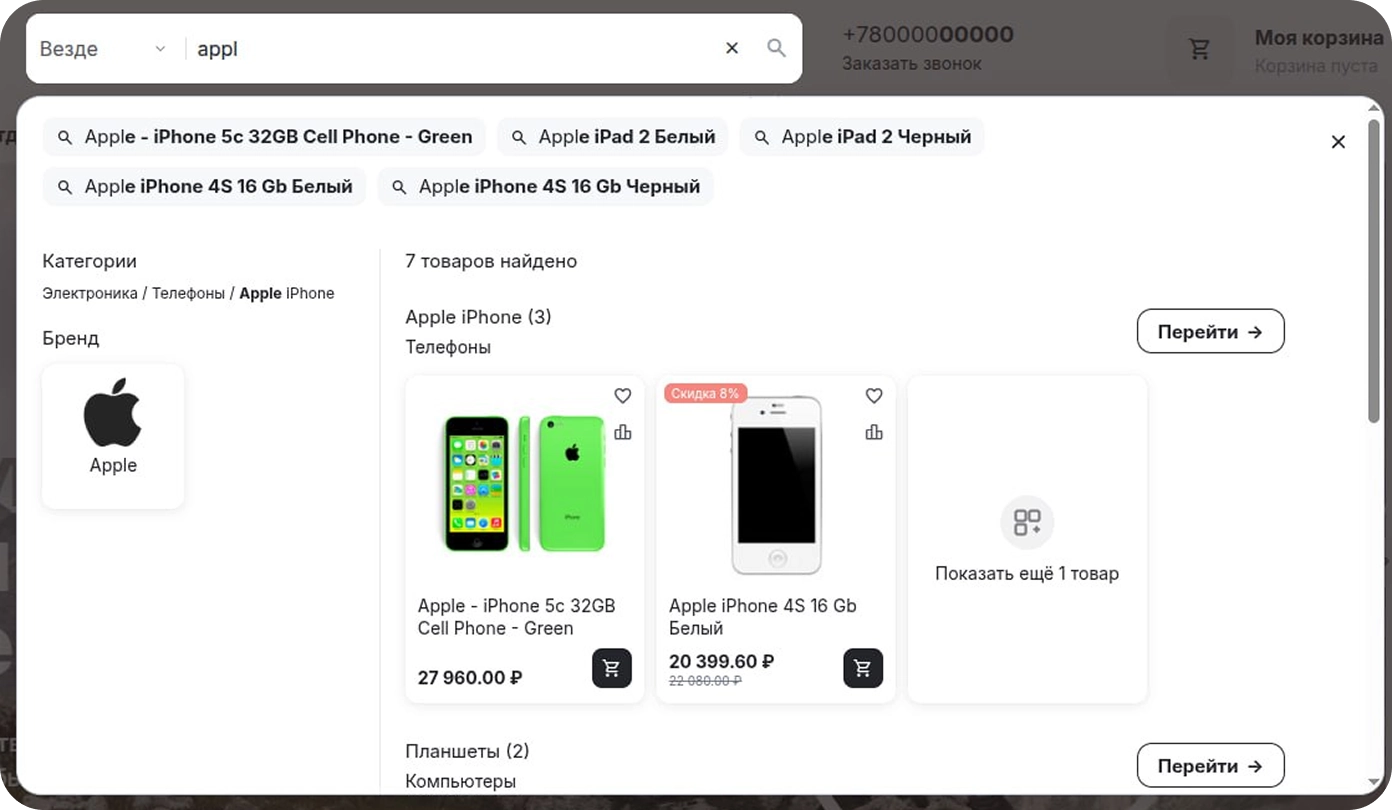
Open the demo store, type a query with a typo or in the wrong keyboard layout and see the results.
Plans by catalog size
Every plan includes all search features: plans differ only in catalog size. Need search for a very large catalog or on your own server? We will put together an option for you.
Scroll the plans sideways to compare →
Catalog
Up to 5,000 products
from $35/month
- All Smart Search features
- Suggestions, typo and keyboard layout correction
- Query analytics
- Custom styling
Popular
Growth
Catalog
Up to 50,000 products
from $70/month
- All Smart Search features
- Suggestions, typo and keyboard layout correction
- Query analytics
- Custom styling
Scale
Catalog
Up to 300,000 products
from $145/month
- All Smart Search features
- Suggestions, typo and keyboard layout correction
- Query analytics
- Custom styling
Your data stays with you
Self-hosted
Hosting
On your infrastructure
from $1,215
one-time turnkey setup
- Server environment setup
- Indexing setup
- Tuning for your project
- Custom design
- 100 days of support
All included
Enterprise
Catalog
Over 300,000 products
On request
custom quote based on your load
- Everything in Scale, with no catalog size limit
- Custom styling to match your store design
- Priority support and maintenance
We will help you choose the right option for your catalog and traffic. The consultation is free.
How to connect it to your site
Your catalog reaches the search in one of four ways: a feed, the API, a site crawler or a ready-made add-on. Pick whichever is easiest for your team: the platform and CMS do not matter.
You give us the export link, the same one you already send to marketplaces or ad platforms. We fetch it on a schedule and keep the index up to date. Nothing needs to be added to the site: if you already have a feed, the connection takes a day.
Your site reports changes itself: a price goes up, an item sells out or a new one arrives, and the index updates at once, without waiting for the next export. Suits stores where prices and stock change during the day. It needs a developer on your side; we provide the documentation and sample requests.
We crawl your storefront like a search engine bot and collect products straight from the pages. It helps when there is no feed, no access to the code and you need search now. All we need from you is the site address.
CS-Cart, Multi-Vendor and OpenCart have an add-on: it installs like any other extension and syncs the catalog out of the box. No development needed; everything is set up in the admin panel.
WordPress, Shopify, Bitrix or a custom-built engine: the search is not tied to a platform. If there is no ready-made add-on, we connect through the API or a feed, and from the outside it works the same.
Show us your catalog structure and how it is exported today, and we will tell you which method is easiest for your team and how long the connection will take. The consultation is free.
Setup steps
Four steps from request to query analytics on your storefront.
We discuss your store, catalog and goals.
We tune search to your assortment and synonyms.
We embed search with no storefront downtime.
You see what shoppers search for and what they could not find.
Setup time: 3–4 days
Frequently asked questions
Standard search looks for exact word matches. Smart Search runs on Elasticsearch: it shows suggestions as you type, corrects typos and keyboard layout mistakes, understands word forms, stays fast on large catalogs and collects query analytics.
Yes. The solution grew out of high-traffic marketplace projects and supports Multi-Vendor.
No. On a cloud plan, the index and all processing run on our infrastructure: your store sends a query and gets ready results back, so search load never hits your hosting, even during peak sales. If you install it on your own server, search runs on a separate Elasticsearch instance, and we will help you choose a configuration for your catalog size.
Nothing to install: we connect search to your store and take care of the infrastructure.
A server with a search engine. We will help with installation and setup.
Search keeps working. When your catalog gets close to the limit, we warn you in advance and offer the next plan. The switch needs no reconfiguration and search does not stop.
CS-Cart for online stores and Multi-Vendor for marketplaces.
Yes. Open the demo store to test search in action, and we will review your catalog on a free consultation.
Connect
Smart Search
to your store
Leave your contacts and we will come back with a quote and timeline. The consultation is free and comes with no obligation.